
Why routing differs in Korea
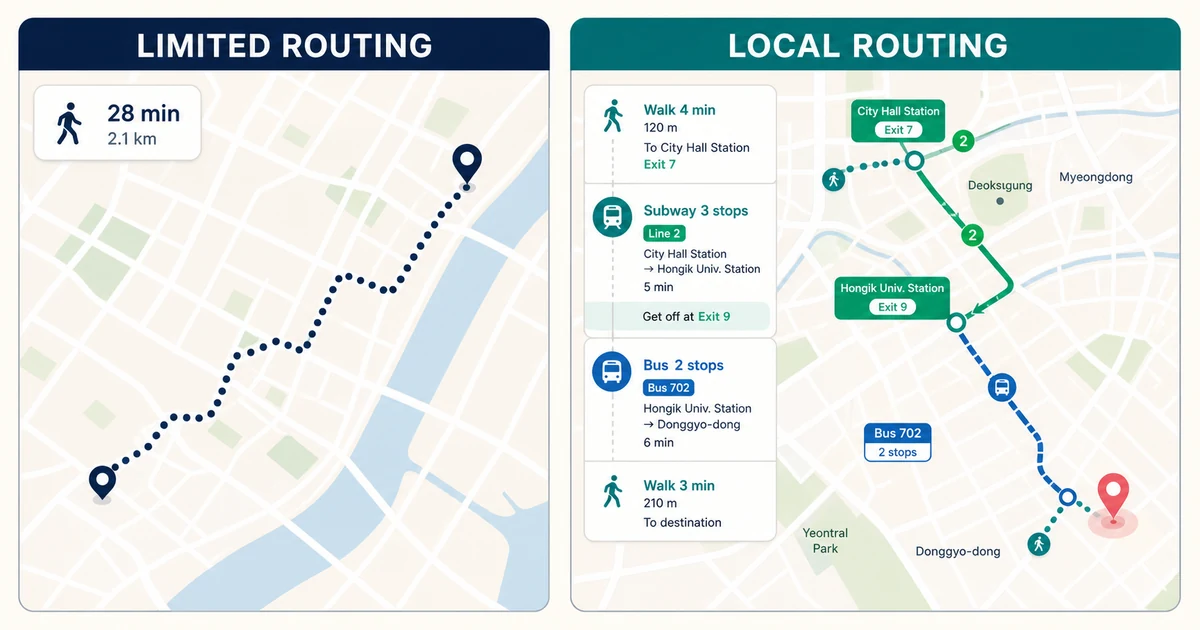
Korea restricts export of high-resolution mapping data for national-security reasons, which has historically limited some global map functions. Available Google features can change, but walking routes and local place details may remain incomplete compared with domestic services. A map pin is not proof that an entrance, footpath or business listing is current.
Set up Naver Map in English
Change the app language where supported, allow location only as needed, and search by Korean venue name, road address or phone number when an English query fails. Save places into trip folders and screenshot the final block, entrance and subway exit. Transit results show line direction, transfer station and exit details.
Use KakaoMap as a second opinion
KakaoMap can resolve local listings or routes differently and is useful when Naver results are ambiguous. Compare the Korean name and telephone number rather than trusting a translated place name. For late-night travel, check the last departure in real time and keep a taxi fallback.
Choose by travel mode
The selector recommends a primary and backup app for walking, subway, bus, driving or place search. Always review live disruption notices, accessibility needs and entrance details. In mountain, coastal or rural areas, carry an offline screenshot and ask the venue for current access guidance.
Verification checklist
- Use the official source: open the linked authority page again shortly before travel because law, eligibility, service and enforcement details can change.
- Keep evidence: save receipts, approvals, labels, screenshots and contact details offline.
- Ask when uncertain: declare goods or contact the responsible authority rather than relying on a calculator result.
Official sources
Time-sensitive details were checked against the original sources below on 2026-08-30.