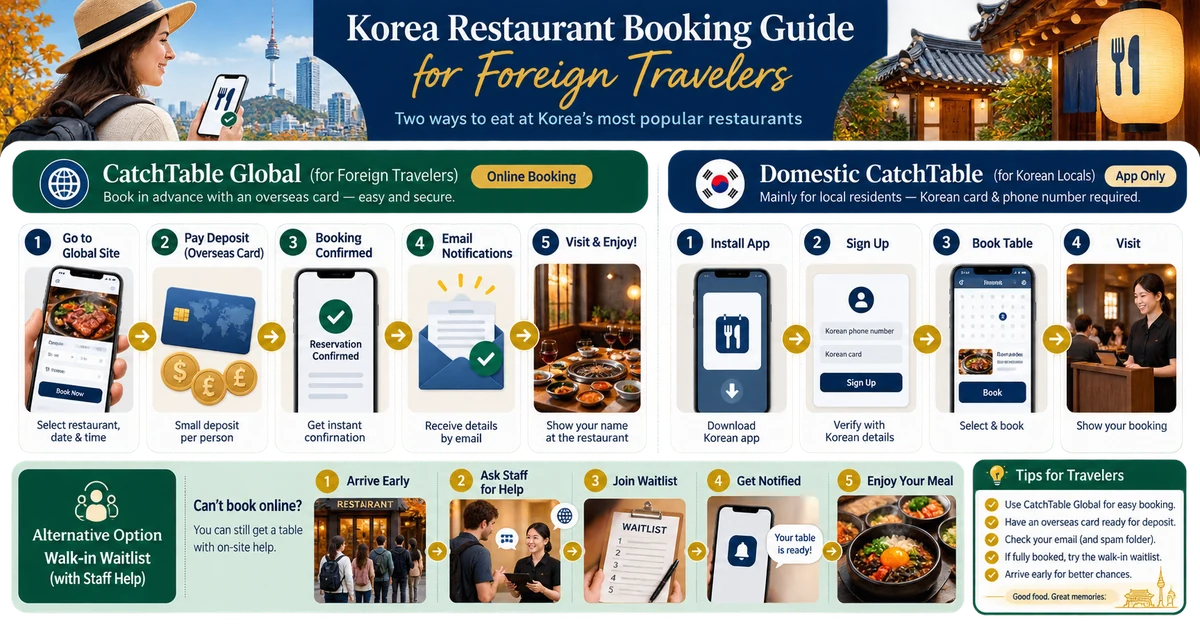

Start in the Global interface
Search the restaurant by exact English or Korean name, date, party size and time. The Global product is designed for overseas visitors and can support English navigation and eligible overseas-card deposits. Availability, supported restaurants and payment methods vary, so a restaurant visible on domestic CatchTable may not offer the same Global booking.
Treat the deposit as a contract
Before paying, read cancellation deadlines, no-show rules, party-size conditions and the currency charged. Save the confirmation and restaurant contact details offline. A card authorization can differ from a captured deposit. If plans change, cancel through the same official channel before the stated cutoff rather than relying on a social message.
Handle on-site waitlists without PASS
Domestic queue kiosks may request a Korean 010 number or Kakao notification. Ask staff whether they can register a foreign number, email, name, or issue a paper queue ticket. Remain nearby and confirm how your turn will be called. Do not enter someone else’s identity details to bypass verification.
Select the workable method
The widget compares Global booking, hotel concierge, direct restaurant contact and walk-in queue. It cannot create inventory. For high-demand dining, prepare two dates and a backup restaurant, verify children or dietary needs directly, and arrive early with the reservation name and confirmation.
Verification checklist
- Use the official source: check the linked provider again shortly before travel because eligibility, prices and operating rules can change.
- Keep a backup: save confirmations and screenshots offline, and carry a second payment, transport or safety option.
- Stop when uncertain: ask the responsible operator instead of repeatedly retrying a payment, booking or security process.
Official sources
Time-sensitive details were checked against the original sources below on 2026-08-30.